
CAD design
FEM simulation in Onshape: strength and safety factor directly in CAD
Onshape FEM simulation without an export: check stresses, deformation and the safety factor directly in CAD and iterate faster in product development.
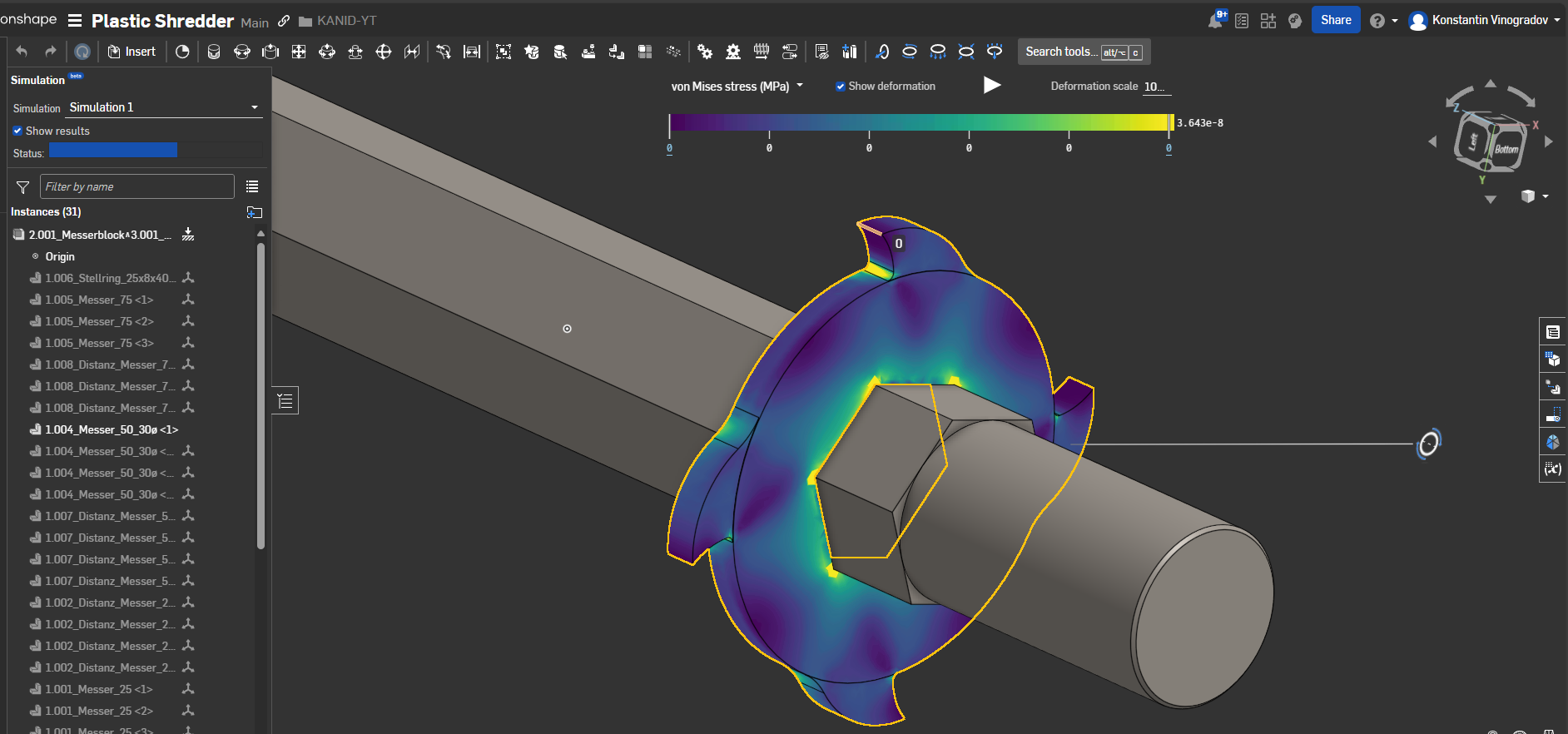
Strength calculation is an indispensable step in modern product development. Traditionally, though, it was a cumbersome process: CAD models had to be exported, imported into a separate simulation program and analysed there at some length. Changes meant repeating the whole cycle. Cloud-native CAD platforms such as Onshape break that old workflow and integrate FEM simulation in Onshape — that is, the finite element method (FEM analysis) — directly into the design environment.
What is an FEM analysis, actually?
The finite element method (FEM) is a numerical method for solving complex physical problems. In design it is used above all for structural analysis. A part is broken down virtually into a mesh of many small elements (the “finite elements”).
With FEM, engineers can simulate how a part behaves under real conditions, for example under compression, tension or vibration. The results show:
- Stresses: Where are the critical regions that could fail?
- Deformations: How much does the part bend or deform?
- Safety factors: Does the design withstand the loads?
This analysis is decisive for ensuring the durability, safety and efficiency of a product.
The advantages of integrated simulation in Onshape
Integrating FEM analysis directly in Onshape offers decisive advantages that speed up the whole development process.
1. A seamless workflow
The greatest advantage is the absence of a break between tools. You do not have to leave Onshape to run a strength calculation. There is no exporting of STEP files and no re-importing after a design change. Every adjustment to the model can be simulated again immediately, without a detour.
2. Faster iterations
Because the simulation is available directly in the CAD tool, designers can test early and often. In a few minutes they can try different design variants, materials or load cases and make data-based decisions. The result is an optimised part in a fraction of the time.
3. Better collaboration
In Onshape, the CAD model and the simulation results are part of the same data set in the cloud. The whole team always has access to the latest results. A colleague can review the simulation results while another is already preparing the next design iteration — all in the same document.
4. Cost efficiency
Early virtual tests drastically reduce the need for expensive physical prototypes. Potential weak points are found and fixed already in the digital phase, which prevents costly errors later in production.
A simple strength calculation in Onshape: step by step
Although the technology is complex, Onshape has made the process remarkably simple:
- Assign a material: Assign your part a material from the built-in library (for example steel, aluminium, plastic).
- Define fixtures: Specify where the part is fixed. This simulates, for example, a bolted joint or a rigid clamp.
- Apply loads: Define the forces acting on the part. That can be a simple force at a point or a pressure on a face.
- Analyse and evaluate: Start the simulation. After a short time Onshape visualises the results directly on the 3D model. You can display stress hotspots, deformations and safety factors in colour and make well-founded improvements.
In brief
What does an FEM analysis in Onshape show?
Stresses, deformations and the safety factor on the part — colour-coded on the 3D model, without an export into a separate simulation program.
When is Onshape FEM worthwhile in design?
Early in the draft: before expensive prototypes are made. Load cases, materials and geometry variants can then be compared in minutes.
Is FEM part of product development at KANID?
Yes, where the design needs it — together with CAD design, browser review and 3D-printed prototypes.
Conclusion: simulation as part of the design
Tools such as the integrated FEM analysis in Onshape democratise simulation. It is no longer the exclusive tool of specialists, but becomes an integral part of the daily design process. By running strength calculations early and continuously, you do not only design faster, but also better, safer and more efficient products.
At KANID, FEM belongs where product development needs it, together with design, browser review and 3D-printed prototypes. More under technical product development and as a design contractor. What a part needs besides strength so that it can actually be manufactured is described in the post Design for manufacture in CAD.
FEMOnshape FEMOnshape FEM simulationstrength calculationsafety factorOnshapeCADsimulationproduct development